Zebra TLP2844 Desktop Barcode Printer User Manual
The Zebra TLP2844 thermal transfer printer features an OpenACCESS design and supports three interface connection methods.
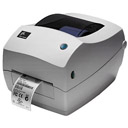
It is a truly compact and versatile desktop printing solution.
Zebra TLP2844 Printer Specifications:
● Printing Method: Thermal Transfer/Thermal Printing
● Print Resolution: 203 dpi (8 dots/mm)
● Maximum Print Width: 114 mm
● Maximum Print Length: 279 mm
● Print Speed: 102 mm/sec
Zebra TLP2844 Physical Specifications:
● Width 200 mm × Length 248 mm × Height 173 mm
● Net Weight: 1.81 kg
Zebra TLP2844 Product Features:
● Standard Memory: 256KB SRAM; 512KB Flash
● 32-bit RISC Microprocessor
● Certifications: UL-CUL 1950; FCC (Class B); VCCI (Class B); C-TICK; EN 500082-1; EN 55022 (Class B)
● Software: ELP2 Language
Zebra TLP2844 Barcodes:
● 1D Barcodes: UPC-A, UPC-E, Code 39, UCC/EAN-128, Code 93, Postnet, Code 128 with subsets A/B/C Interleaved 2 of 5, 2D codes, UPC with 2 or 5 digit supplements, Code 128 UCC, Codabar, German Post, Plessey
● 2D Barcodes: PDF417, Maxi Code, QR-Code (requires Asian version printer)
Zebra TLP2844 operating environment:
● Storage temperature: -40℃—60℃
Other specifications of the Zebra TLP2844:
● Communication interfaces: RS232 series, USB, etc.